# On-Ramp & Off-Ramp

### What do the terms On-Ramp and Off-Ramp mean?

In the context of cryptoassets, an On-Ramp refers to a method of acquiring cryptocurrency, while an Off-Ramp refers to a method of selling or exchanging cryptocurrency for traditional currency or other assets.

An On-Ramp could be a platform or service that allows users to purchase cryptoassets using traditional currency (such as USD or EUR) or other cryptoassets.

An Off-Ramp, on the other hand, could be a platform or service that allows users to sell their cryptoassets for traditional currency or exchange it for other assets.

### How to buy cryptoassets or tokens with your credit card?

To Buy cryptoassets with a credit card, follow the below steps:

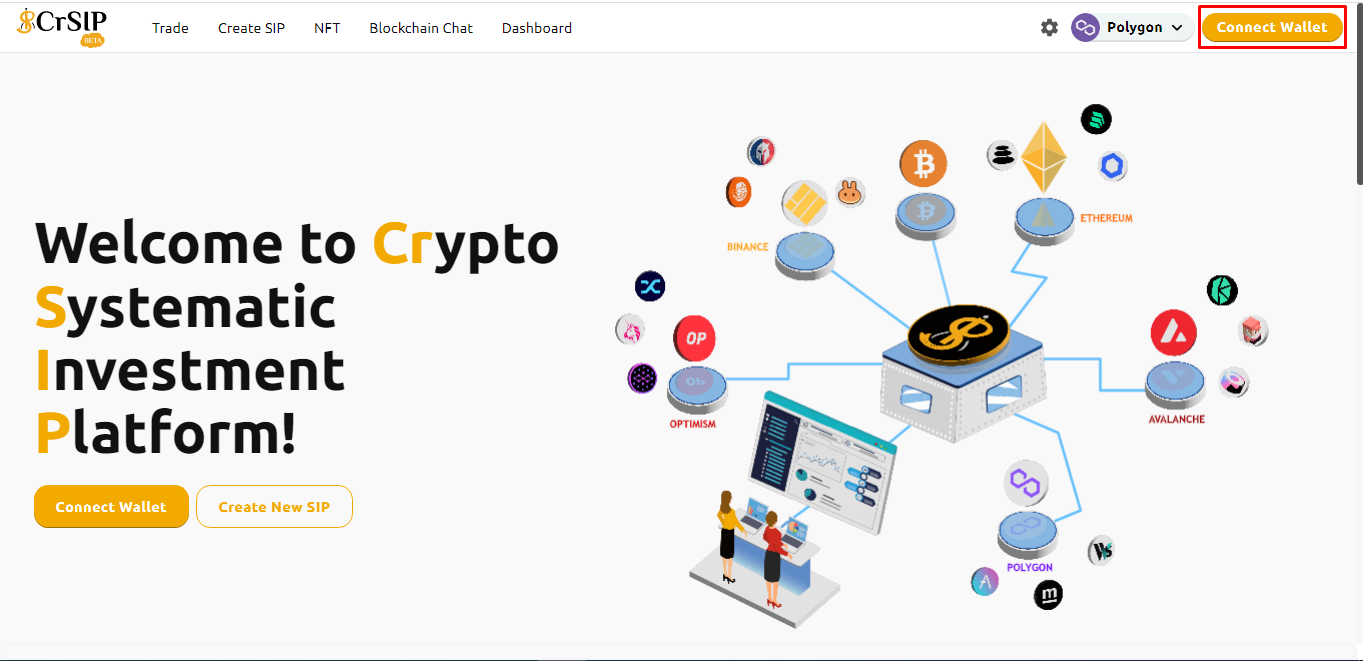
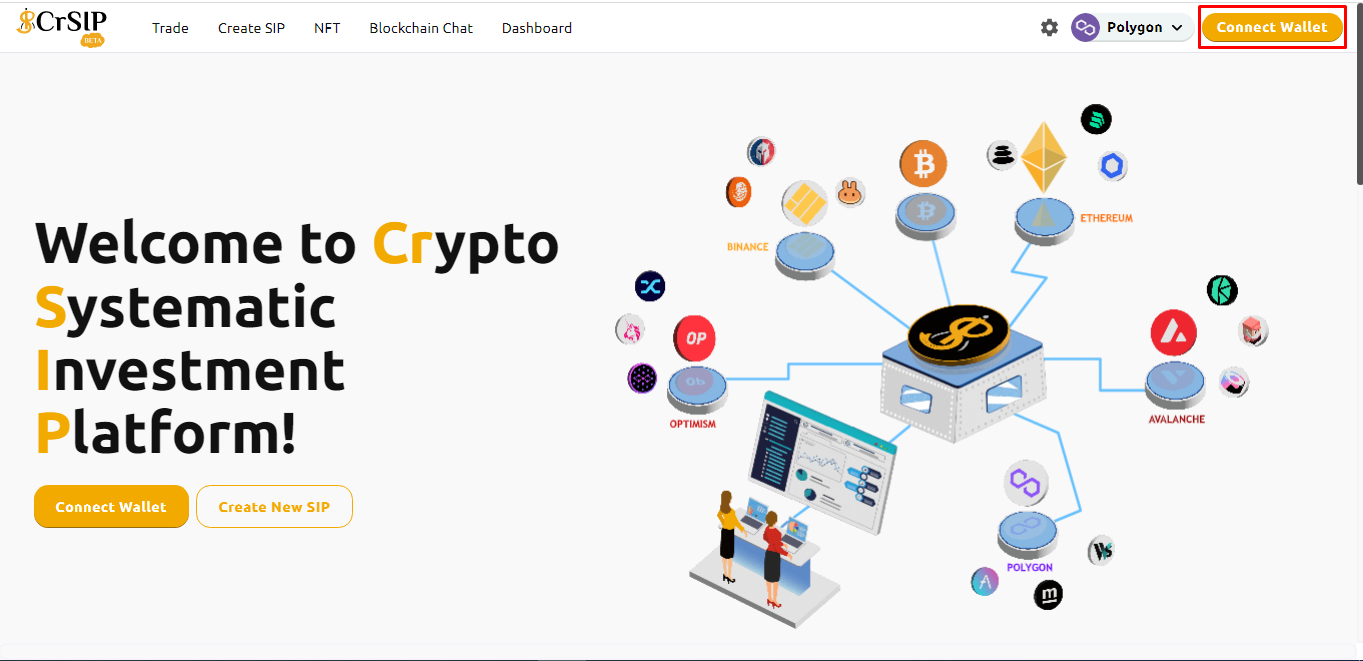
1\. On the CrSIP Platform, connect your wallet.

<figure><img src="https://1478603104-files.gitbook.io/~/files/v0/b/gitbook-x-prod.appspot.com/o/spaces%2FL8lItflvtIgpkNw9ssSm%2Fuploads%2FWFUjZkkrlizkP93Pnk4m%2Fconnect%20wallet.png?alt=media&#x26;token=ebf2a40c-af2d-4e1b-b91a-861b58bc22e7" alt=""><figcaption></figcaption></figure>

<figure><img src="https://1478603104-files.gitbook.io/~/files/v0/b/gitbook-x-prod.appspot.com/o/spaces%2FL8lItflvtIgpkNw9ssSm%2Fuploads%2FhpsIMmx5jp6PIBOJAnz5%2Fline%202.png?alt=media&#x26;token=644964ab-c87b-4efc-89dd-92bddbd4af7f" alt=""><figcaption></figcaption></figure>

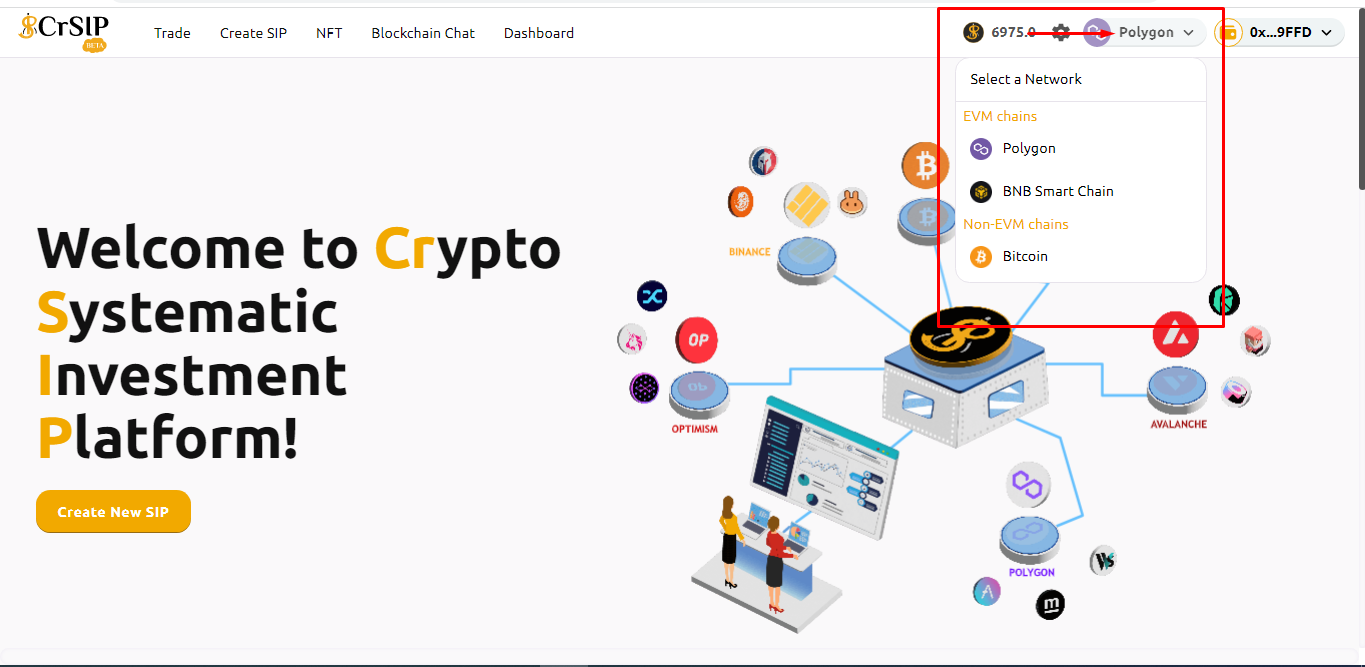
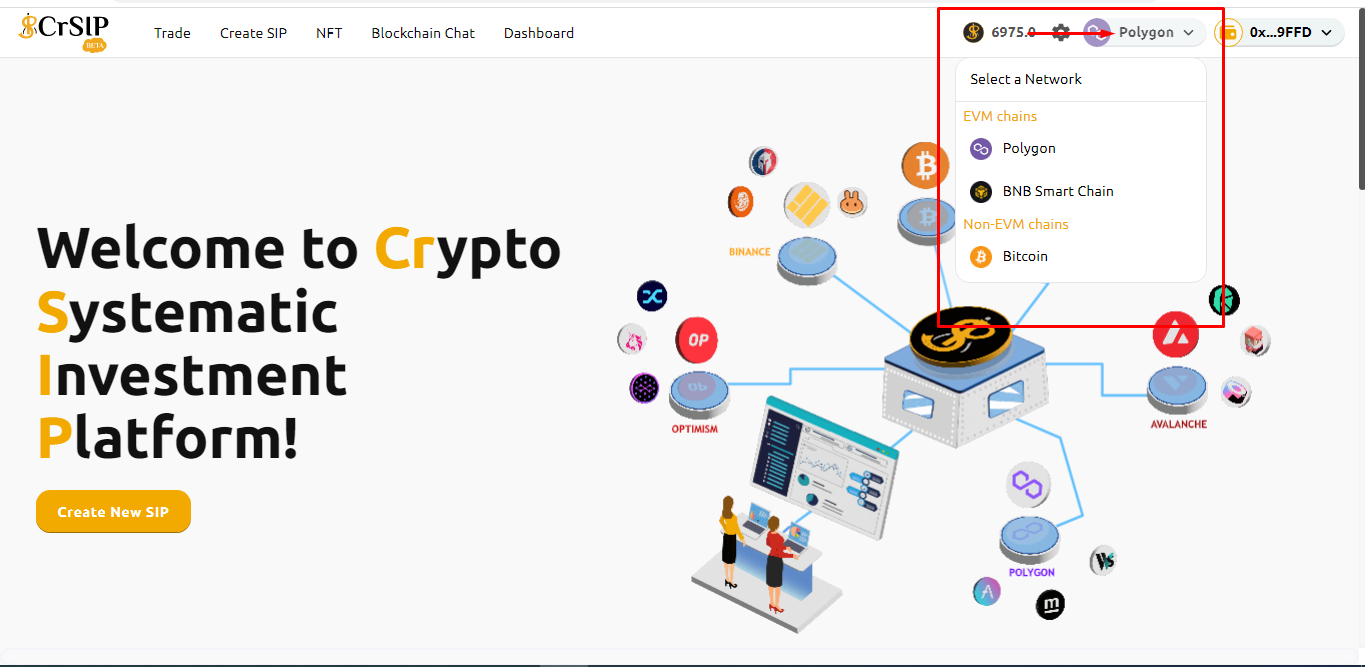
2. After connecting your wallet, select Network.

<figure><img src="https://1478603104-files.gitbook.io/~/files/v0/b/gitbook-x-prod.appspot.com/o/spaces%2FL8lItflvtIgpkNw9ssSm%2Fuploads%2FqJsp9xnlXRCHK2hYJNKD%2Fnetwork.png?alt=media&#x26;token=51970feb-ace7-41d3-bae8-bbac80f00398" alt=""><figcaption></figcaption></figure>

<figure><img src="https://1478603104-files.gitbook.io/~/files/v0/b/gitbook-x-prod.appspot.com/o/spaces%2FL8lItflvtIgpkNw9ssSm%2Fuploads%2FhpsIMmx5jp6PIBOJAnz5%2Fline%202.png?alt=media&#x26;token=644964ab-c87b-4efc-89dd-92bddbd4af7f" alt=""><figcaption></figcaption></figure>

3. Click on “Trade” and then choose **“Buy crypto On-Ramp”**.

<figure><img src="https://1478603104-files.gitbook.io/~/files/v0/b/gitbook-x-prod.appspot.com/o/spaces%2FL8lItflvtIgpkNw9ssSm%2Fuploads%2F0PeHDkZnfSh43T7gmLap%2Fram1..png?alt=media&#x26;token=a81999ed-c8bc-4891-9be8-33748e932109" alt=""><figcaption></figcaption></figure>

<figure><img src="https://1478603104-files.gitbook.io/~/files/v0/b/gitbook-x-prod.appspot.com/o/spaces%2FL8lItflvtIgpkNw9ssSm%2Fuploads%2FhpsIMmx5jp6PIBOJAnz5%2Fline%202.png?alt=media&#x26;token=644964ab-c87b-4efc-89dd-92bddbd4af7f" alt=""><figcaption></figcaption></figure>

&#x20;

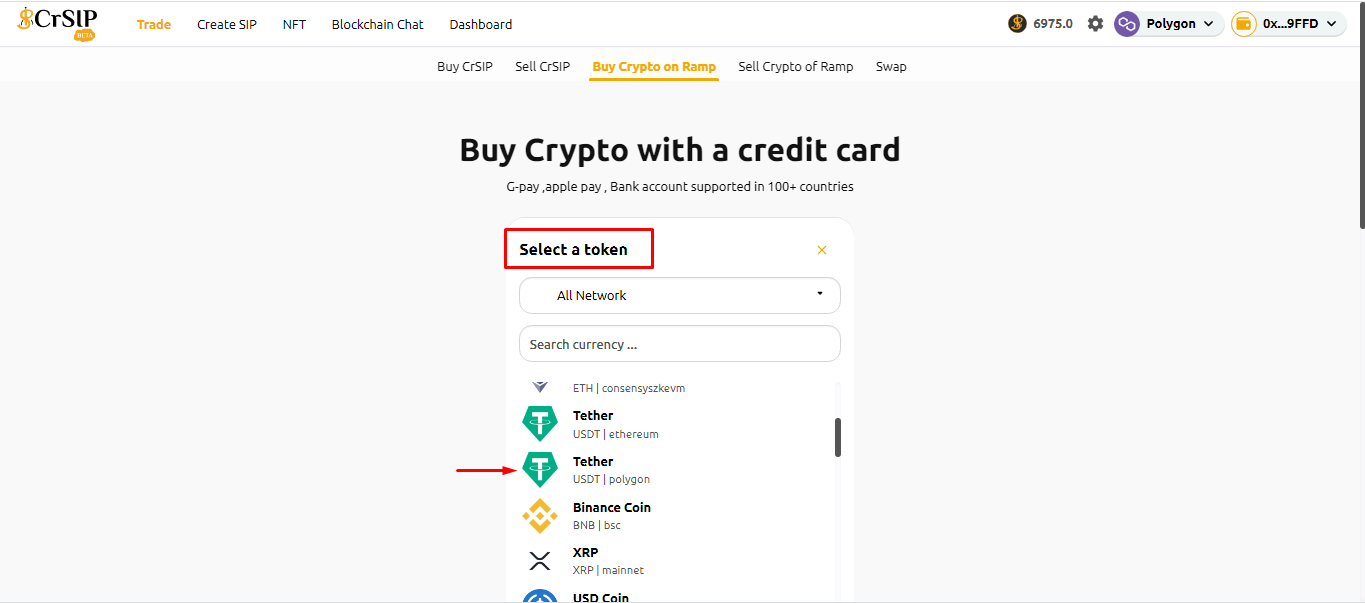
&#x20; 4\.  Select the **crypto token** which you would like to buy.

<figure><img src="https://1478603104-files.gitbook.io/~/files/v0/b/gitbook-x-prod.appspot.com/o/spaces%2FL8lItflvtIgpkNw9ssSm%2Fuploads%2FnoSS70f5oRdDJeWbzUbE%2Framp5.png?alt=media&#x26;token=71db040a-c95f-4734-8332-1e1456ac8e04" alt=""><figcaption></figcaption></figure>

<figure><img src="https://1478603104-files.gitbook.io/~/files/v0/b/gitbook-x-prod.appspot.com/o/spaces%2FL8lItflvtIgpkNw9ssSm%2Fuploads%2FOeZedq2pqVj0VtkoISzZ%2Fline%202.png?alt=media&#x26;token=bfa5d056-880e-478e-9b31-9f1d3a9e2e6c" alt=""><figcaption></figcaption></figure>

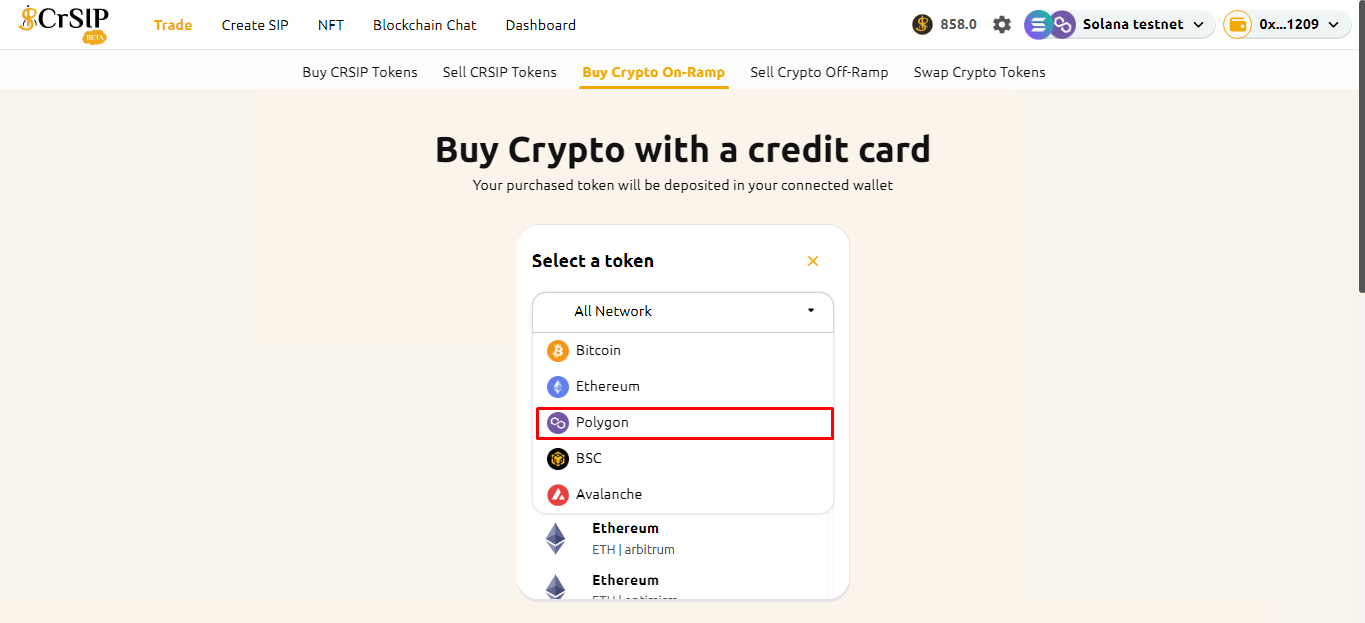
5. \[OPTIONAL] You can filter by blockchain network.

<figure><img src="https://1478603104-files.gitbook.io/~/files/v0/b/gitbook-x-prod.appspot.com/o/spaces%2FL8lItflvtIgpkNw9ssSm%2Fuploads%2FTt1otbkSvFuqGwsr8KyR%2Fbuy%20network.png?alt=media&#x26;token=45e6a7ea-be0b-4dda-b30f-62174fbebea6" alt=""><figcaption></figcaption></figure>

<figure><img src="https://1478603104-files.gitbook.io/~/files/v0/b/gitbook-x-prod.appspot.com/o/spaces%2FL8lItflvtIgpkNw9ssSm%2Fuploads%2FoLtYePdyr2idYNUuVr3L%2Fline%202.png?alt=media&#x26;token=87fa8d64-a335-4a7a-90fe-88bbf99fc237" alt=""><figcaption></figcaption></figure>

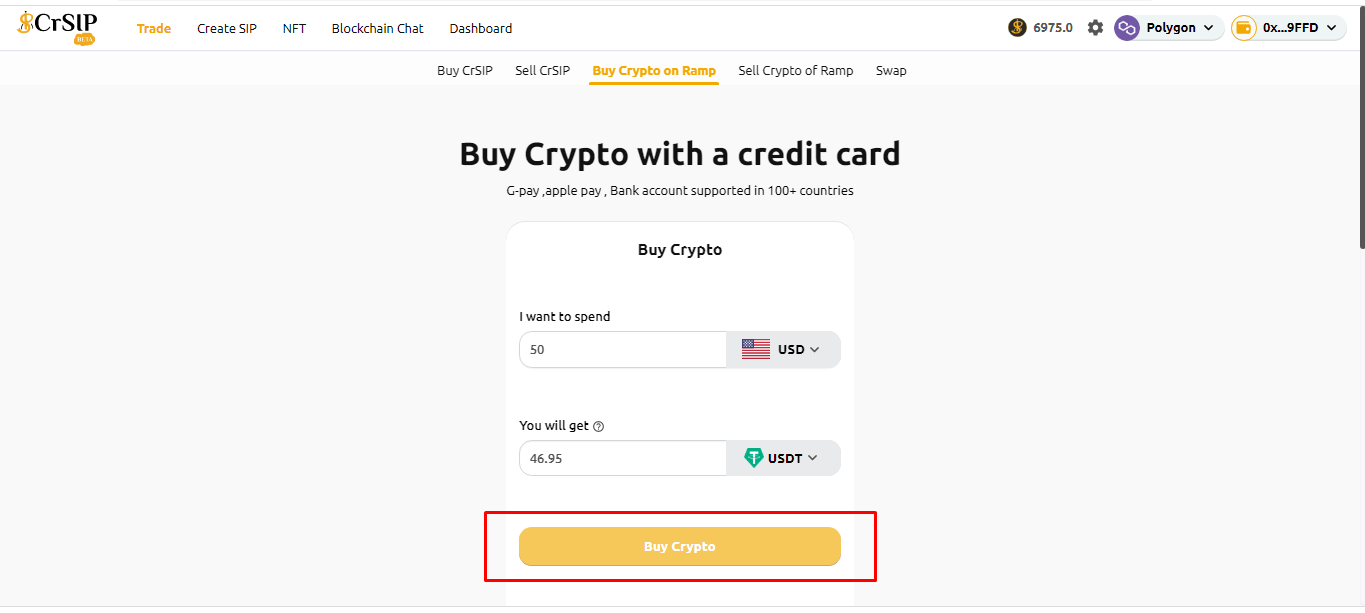
6. Enter the amount you want to spend, and the amount cannot be below the provider's minimum: 50.  Click on **“Buy crypto"**.

<figure><img src="https://1478603104-files.gitbook.io/~/files/v0/b/gitbook-x-prod.appspot.com/o/spaces%2FL8lItflvtIgpkNw9ssSm%2Fuploads%2F00JqLmnBUl4xO8d3sobk%2Framp%206.png?alt=media&#x26;token=84fd725b-64f5-4467-ba61-37e28a8bbc49" alt=""><figcaption></figcaption></figure>

<figure><img src="https://1478603104-files.gitbook.io/~/files/v0/b/gitbook-x-prod.appspot.com/o/spaces%2FL8lItflvtIgpkNw9ssSm%2Fuploads%2FhpsIMmx5jp6PIBOJAnz5%2Fline%202.png?alt=media&#x26;token=644964ab-c87b-4efc-89dd-92bddbd4af7f" alt=""><figcaption></figcaption></figure>

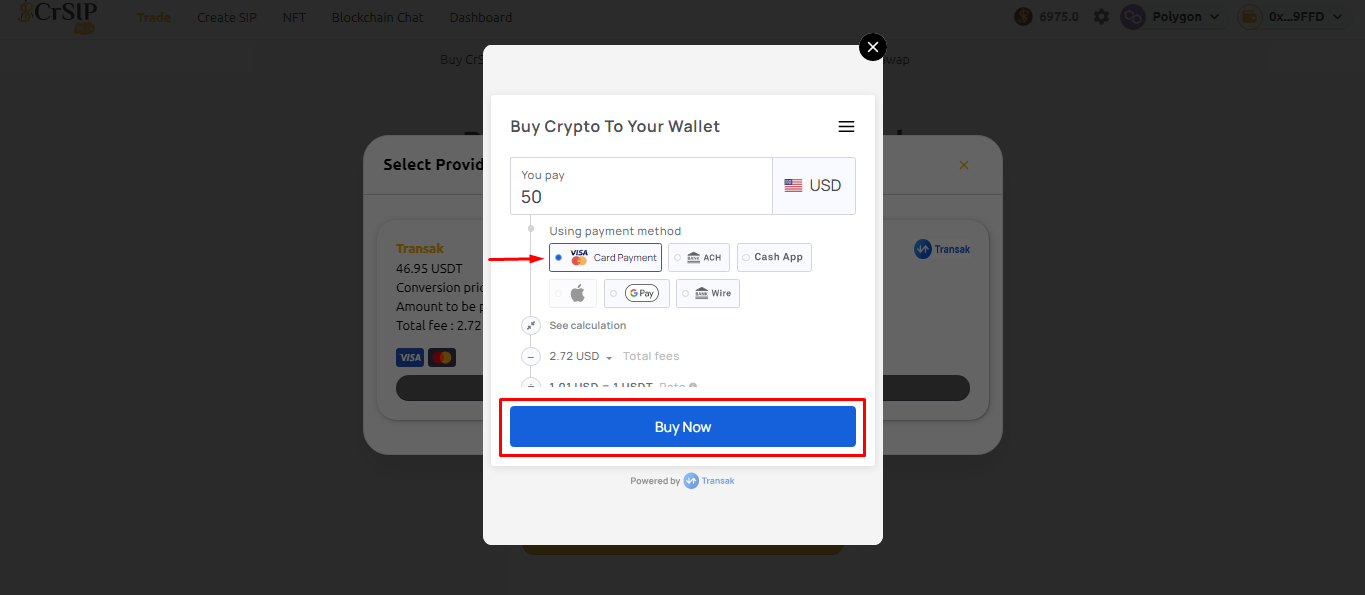
7. Check the details and click on "**Buy Now**"**.**

<figure><img src="https://1478603104-files.gitbook.io/~/files/v0/b/gitbook-x-prod.appspot.com/o/spaces%2FL8lItflvtIgpkNw9ssSm%2Fuploads%2FrgnPm0bouDhTfj1Xjz2L%2Framp%207..png?alt=media&#x26;token=aa6151cc-ad9d-4fbf-89be-12e19fa28b2a" alt=""><figcaption></figcaption></figure>

<figure><img src="https://1478603104-files.gitbook.io/~/files/v0/b/gitbook-x-prod.appspot.com/o/spaces%2FL8lItflvtIgpkNw9ssSm%2Fuploads%2FhpsIMmx5jp6PIBOJAnz5%2Fline%202.png?alt=media&#x26;token=644964ab-c87b-4efc-89dd-92bddbd4af7f" alt=""><figcaption></figcaption></figure>

8. For Buy Crypto to Your Wallet select the payment method and click on "**Buy now".**

<figure><img src="https://1478603104-files.gitbook.io/~/files/v0/b/gitbook-x-prod.appspot.com/o/spaces%2FL8lItflvtIgpkNw9ssSm%2Fuploads%2FL8RgUZRBDMXhP6x0LV46%2Framp8.png?alt=media&#x26;token=a9f0996e-fcd2-4a6d-a1b2-c991e72a0394" alt=""><figcaption></figcaption></figure>

<figure><img src="https://1478603104-files.gitbook.io/~/files/v0/b/gitbook-x-prod.appspot.com/o/spaces%2FL8lItflvtIgpkNw9ssSm%2Fuploads%2FhpsIMmx5jp6PIBOJAnz5%2Fline%202.png?alt=media&#x26;token=644964ab-c87b-4efc-89dd-92bddbd4af7f" alt=""><figcaption></figcaption></figure>

9. Check the details and click on "**Buy USDT**".

<figure><img src="https://1478603104-files.gitbook.io/~/files/v0/b/gitbook-x-prod.appspot.com/o/spaces%2FL8lItflvtIgpkNw9ssSm%2Fuploads%2F02V7pdYG8wOVCeZrmE1d%2Framp%209..png?alt=media&#x26;token=11cf7645-7bbf-45d6-be75-35a8d1198591" alt=""><figcaption></figcaption></figure>

<figure><img src="https://1478603104-files.gitbook.io/~/files/v0/b/gitbook-x-prod.appspot.com/o/spaces%2FL8lItflvtIgpkNw9ssSm%2Fuploads%2FhpsIMmx5jp6PIBOJAnz5%2Fline%202.png?alt=media&#x26;token=644964ab-c87b-4efc-89dd-92bddbd4af7f" alt=""><figcaption></figcaption></figure>

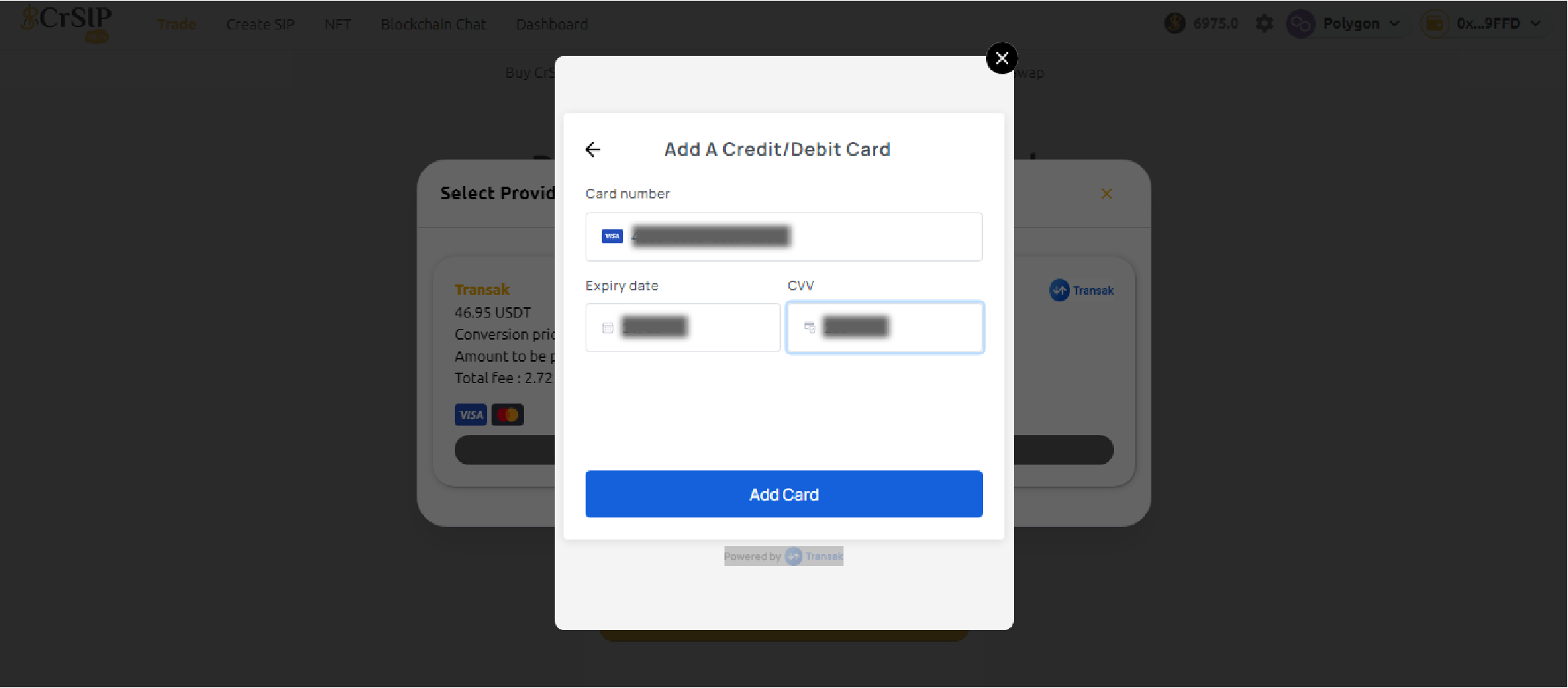
10. Enter your credit / debit card details and click on the "**Add card".**

<figure><img src="https://1478603104-files.gitbook.io/~/files/v0/b/gitbook-x-prod.appspot.com/o/spaces%2FL8lItflvtIgpkNw9ssSm%2Fuploads%2FQbdOvcuDl4jqYJ2WRZLX%2Framp10.png?alt=media&#x26;token=f057f489-33f1-430b-8243-5a887971e902" alt=""><figcaption></figcaption></figure>

<figure><img src="https://1478603104-files.gitbook.io/~/files/v0/b/gitbook-x-prod.appspot.com/o/spaces%2FL8lItflvtIgpkNw9ssSm%2Fuploads%2FhpsIMmx5jp6PIBOJAnz5%2Fline%202.png?alt=media&#x26;token=644964ab-c87b-4efc-89dd-92bddbd4af7f" alt=""><figcaption></figcaption></figure>

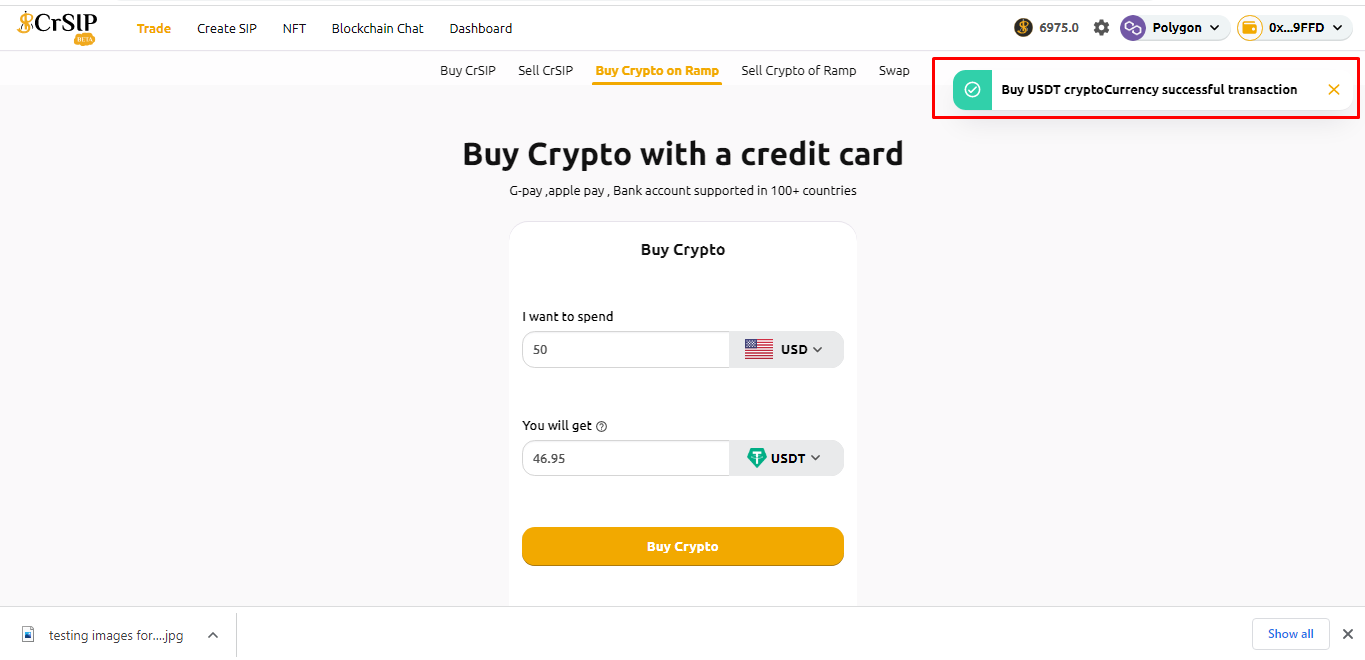
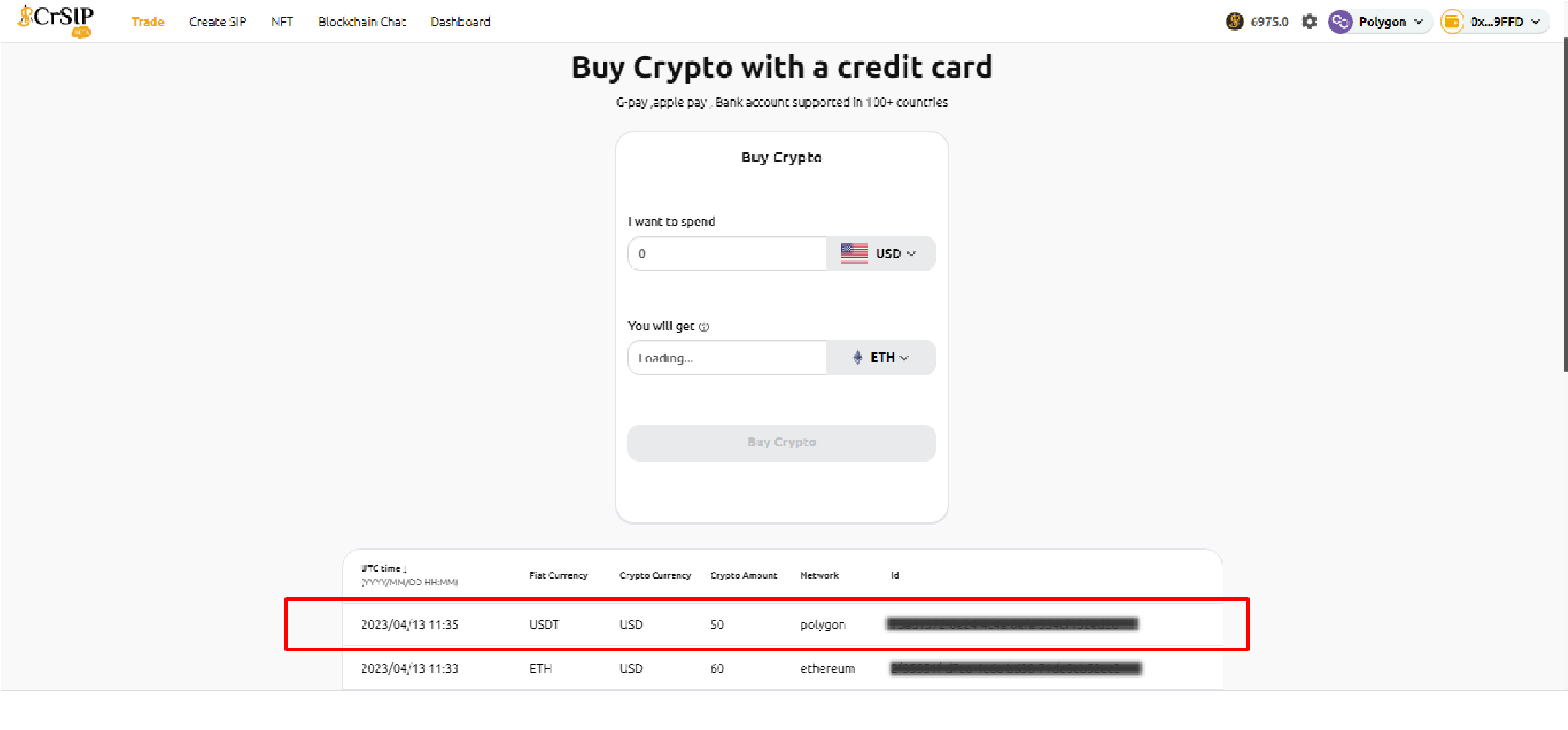
11. A pop-up will be shown, "**Successful Transaction.**".&#x20;

<figure><img src="https://1478603104-files.gitbook.io/~/files/v0/b/gitbook-x-prod.appspot.com/o/spaces%2FL8lItflvtIgpkNw9ssSm%2Fuploads%2FeV0CNzq4nDPUSZiDeXLd%2Framp11.png?alt=media&#x26;token=ab65197b-96db-4e00-a3fd-24a8299db828" alt=""><figcaption></figcaption></figure>

<figure><img src="https://1478603104-files.gitbook.io/~/files/v0/b/gitbook-x-prod.appspot.com/o/spaces%2FL8lItflvtIgpkNw9ssSm%2Fuploads%2FhpsIMmx5jp6PIBOJAnz5%2Fline%202.png?alt=media&#x26;token=644964ab-c87b-4efc-89dd-92bddbd4af7f" alt=""><figcaption></figcaption></figure>

12. Scroll down to verify your wallet address, where you will receive your purchased USDT tokens on the Polygon network.

<figure><img src="https://1478603104-files.gitbook.io/~/files/v0/b/gitbook-x-prod.appspot.com/o/spaces%2FL8lItflvtIgpkNw9ssSm%2Fuploads%2FDKNDgWCcSGSKH79FfvpT%2F12ramp.png?alt=media&#x26;token=29667f17-cc12-4885-8878-f470172b3246" alt=""><figcaption></figcaption></figure>

### How to sell cryptoassets?

To sell cryptoassets, follow the below steps:

1\. On the CrSIP Platform, connect your wallet.

<figure><img src="https://1478603104-files.gitbook.io/~/files/v0/b/gitbook-x-prod.appspot.com/o/spaces%2FL8lItflvtIgpkNw9ssSm%2Fuploads%2FAHR5DRImT88rjH7mxtZE%2Fconnect%20wallet.png?alt=media&#x26;token=51b98933-33c0-4203-8db6-5bded00e1040" alt=""><figcaption></figcaption></figure>

<figure><img src="https://1478603104-files.gitbook.io/~/files/v0/b/gitbook-x-prod.appspot.com/o/spaces%2FL8lItflvtIgpkNw9ssSm%2Fuploads%2FhpsIMmx5jp6PIBOJAnz5%2Fline%202.png?alt=media&#x26;token=644964ab-c87b-4efc-89dd-92bddbd4af7f" alt=""><figcaption></figcaption></figure>

2. After connecting your wallet, select Network.

<figure><img src="https://1478603104-files.gitbook.io/~/files/v0/b/gitbook-x-prod.appspot.com/o/spaces%2FL8lItflvtIgpkNw9ssSm%2Fuploads%2F6fVZz1g8d4BfN20emNgU%2Fnetwork.png?alt=media&#x26;token=235a3606-a512-49ca-a53f-4f4d0954f216" alt=""><figcaption></figcaption></figure>

<figure><img src="https://1478603104-files.gitbook.io/~/files/v0/b/gitbook-x-prod.appspot.com/o/spaces%2FL8lItflvtIgpkNw9ssSm%2Fuploads%2FOeZedq2pqVj0VtkoISzZ%2Fline%202.png?alt=media&#x26;token=bfa5d056-880e-478e-9b31-9f1d3a9e2e6c" alt=""><figcaption></figcaption></figure>

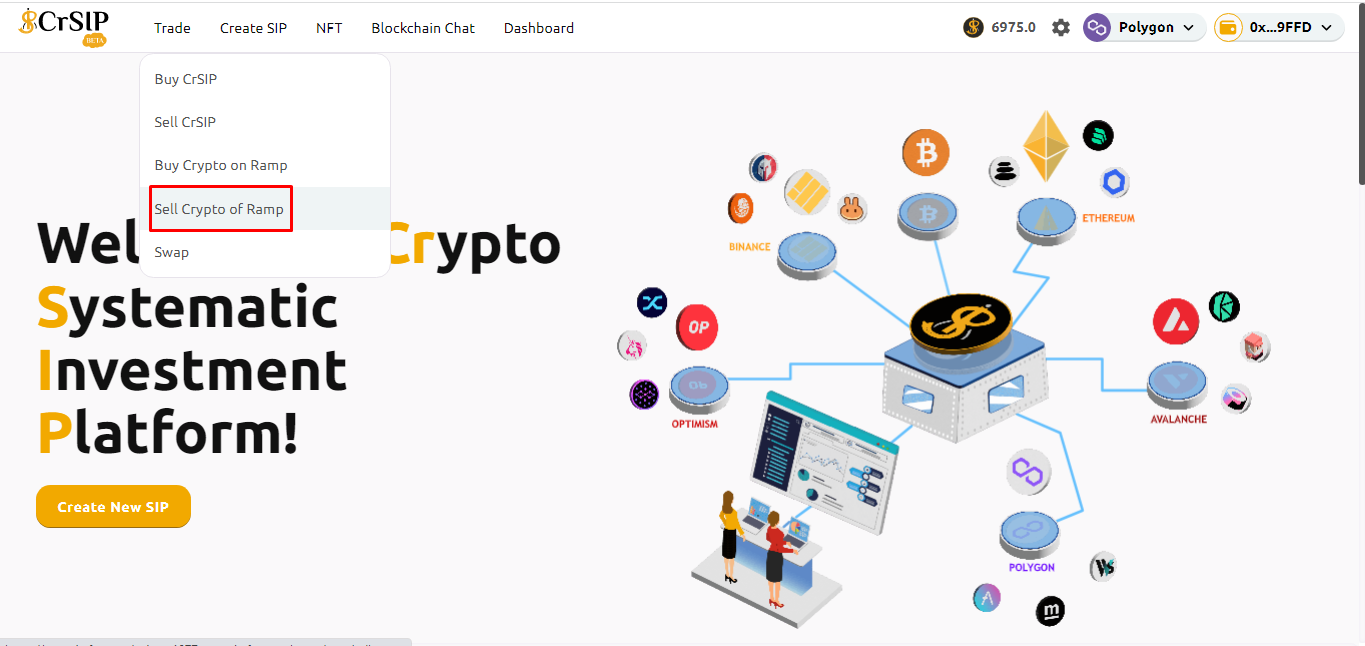
3. Click on “Trade” and then choose **“Sell crypto Off-Ramp”.**

<figure><img src="https://1478603104-files.gitbook.io/~/files/v0/b/gitbook-x-prod.appspot.com/o/spaces%2FL8lItflvtIgpkNw9ssSm%2Fuploads%2Fz4cJFMKXJsO92B9NkomX%2FSell%20Ram%5Bp2.png?alt=media&#x26;token=083770bd-3ad5-44bf-a7b1-d3dd0b0119c3" alt=""><figcaption></figcaption></figure>

<figure><img src="https://1478603104-files.gitbook.io/~/files/v0/b/gitbook-x-prod.appspot.com/o/spaces%2FL8lItflvtIgpkNw9ssSm%2Fuploads%2FOeZedq2pqVj0VtkoISzZ%2Fline%202.png?alt=media&#x26;token=bfa5d056-880e-478e-9b31-9f1d3a9e2e6c" alt=""><figcaption></figcaption></figure>

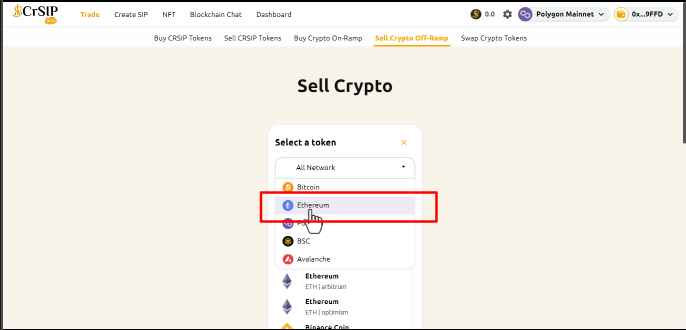
4. Select a network on which you would like to sell.

<figure><img src="https://1478603104-files.gitbook.io/~/files/v0/b/gitbook-x-prod.appspot.com/o/spaces%2FL8lItflvtIgpkNw9ssSm%2Fuploads%2Fz5YynV7HP97R1GUW52su%2FSell%20crypto%20network.png?alt=media&#x26;token=ff61dfc8-0e7d-4b42-aa34-dcb603f9a50d" alt=""><figcaption></figcaption></figure>

<figure><img src="https://1478603104-files.gitbook.io/~/files/v0/b/gitbook-x-prod.appspot.com/o/spaces%2FL8lItflvtIgpkNw9ssSm%2Fuploads%2F1WRJLCjuXTU3XwEajQ9l%2Fline%202.png?alt=media&#x26;token=0cda12ce-fea8-4bc1-a22e-8265a55bf3e0" alt=""><figcaption></figcaption></figure>

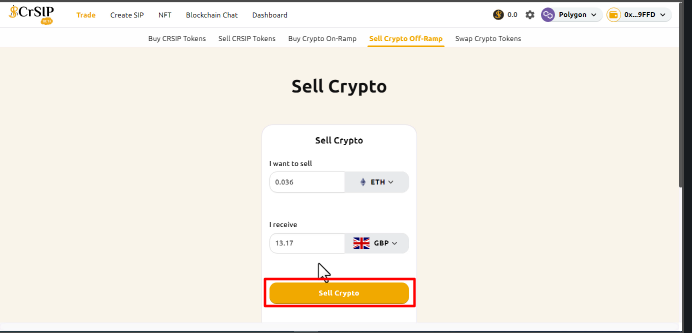
5. Select the crypto currency you want to sell and enter the amount you want to sell.

<figure><img src="https://1478603104-files.gitbook.io/~/files/v0/b/gitbook-x-prod.appspot.com/o/spaces%2FL8lItflvtIgpkNw9ssSm%2Fuploads%2Fgd6C62xcZacw9MYA5oIt%2Fcrypto%20C%20want.png?alt=media&#x26;token=f92e65a0-e9a4-4f79-9fbb-d0e8fc309d5e" alt=""><figcaption></figcaption></figure>

<figure><img src="https://1478603104-files.gitbook.io/~/files/v0/b/gitbook-x-prod.appspot.com/o/spaces%2FL8lItflvtIgpkNw9ssSm%2Fuploads%2F1WRJLCjuXTU3XwEajQ9l%2Fline%202.png?alt=media&#x26;token=0cda12ce-fea8-4bc1-a22e-8265a55bf3e0" alt=""><figcaption></figcaption></figure>

6. Select the currency you want to receive and click on "**Sell crypto**".

<figure><img src="https://1478603104-files.gitbook.io/~/files/v0/b/gitbook-x-prod.appspot.com/o/spaces%2FL8lItflvtIgpkNw9ssSm%2Fuploads%2FzOAzJPNxH7dGQCMlwfV5%2Famount%20%26%20sell.png?alt=media&#x26;token=d4069ef2-f34f-41b3-bd45-1c77a2e2e75d" alt=""><figcaption></figcaption></figure>

<figure><img src="https://1478603104-files.gitbook.io/~/files/v0/b/gitbook-x-prod.appspot.com/o/spaces%2FL8lItflvtIgpkNw9ssSm%2Fuploads%2FOeZedq2pqVj0VtkoISzZ%2Fline%202.png?alt=media&#x26;token=bfa5d056-880e-478e-9b31-9f1d3a9e2e6c" alt=""><figcaption></figcaption></figure>

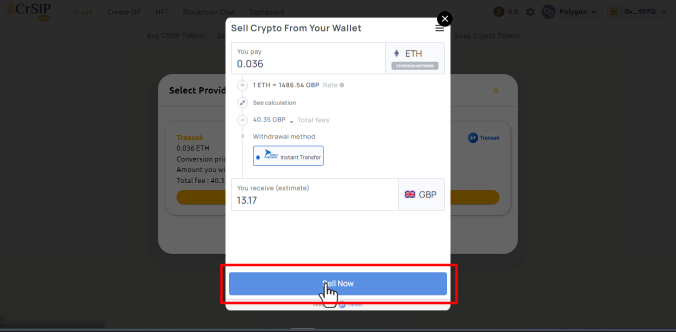
7. Check the details of the Sell crypto wallet and click on the "**Sell Now"** button.

<figure><img src="https://1478603104-files.gitbook.io/~/files/v0/b/gitbook-x-prod.appspot.com/o/spaces%2FL8lItflvtIgpkNw9ssSm%2Fuploads%2FLGBKDxEDrdnOZwxclAaA%2FSell%20crypto%20wallet.png?alt=media&#x26;token=9bf032c1-9110-4bed-a1dc-5dcf94453a21" alt=""><figcaption></figcaption></figure>

<figure><img src="https://1478603104-files.gitbook.io/~/files/v0/b/gitbook-x-prod.appspot.com/o/spaces%2FL8lItflvtIgpkNw9ssSm%2Fuploads%2FOeZedq2pqVj0VtkoISzZ%2Fline%202.png?alt=media&#x26;token=bfa5d056-880e-478e-9b31-9f1d3a9e2e6c" alt=""><figcaption></figcaption></figure>

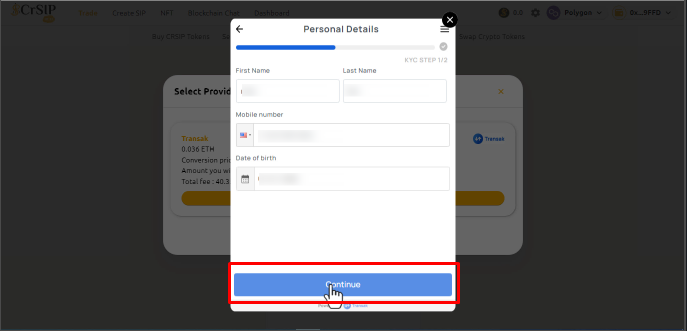
8. Enter your personal details and click "**Continue**".

<figure><img src="https://1478603104-files.gitbook.io/~/files/v0/b/gitbook-x-prod.appspot.com/o/spaces%2FL8lItflvtIgpkNw9ssSm%2Fuploads%2FCTm0QoaqiIqt05uAS2Lb%2Fpc%20detais.png?alt=media&#x26;token=6a3de976-f39b-45bb-9a06-511d0020fb27" alt=""><figcaption></figcaption></figure>

<figure><img src="https://1478603104-files.gitbook.io/~/files/v0/b/gitbook-x-prod.appspot.com/o/spaces%2FL8lItflvtIgpkNw9ssSm%2Fuploads%2FOeZedq2pqVj0VtkoISzZ%2Fline%202.png?alt=media&#x26;token=bfa5d056-880e-478e-9b31-9f1d3a9e2e6c" alt=""><figcaption></figcaption></figure>

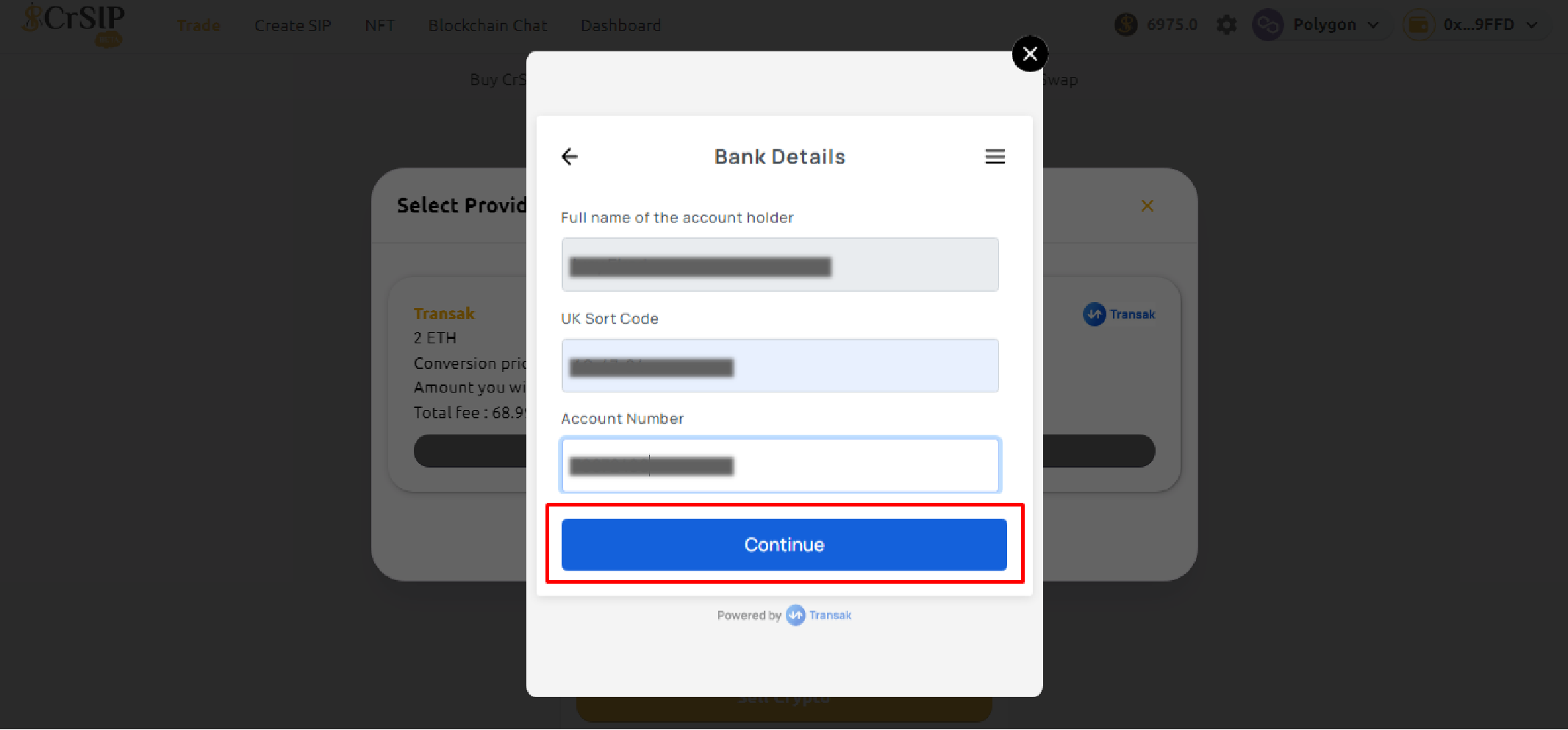
9. Continue with your bank details and click on "**Continue**" button.

<figure><img src="https://1478603104-files.gitbook.io/~/files/v0/b/gitbook-x-prod.appspot.com/o/spaces%2FL8lItflvtIgpkNw9ssSm%2Fuploads%2Fbvae3amY8T5OaVYbMSWW%2Fsell%20ramp%206.png?alt=media&#x26;token=bee86ec8-b6d9-47d9-bbb6-732711a8706d" alt=""><figcaption></figcaption></figure>

<figure><img src="https://1478603104-files.gitbook.io/~/files/v0/b/gitbook-x-prod.appspot.com/o/spaces%2FL8lItflvtIgpkNw9ssSm%2Fuploads%2F1WRJLCjuXTU3XwEajQ9l%2Fline%202.png?alt=media&#x26;token=0cda12ce-fea8-4bc1-a22e-8265a55bf3e0" alt=""><figcaption></figcaption></figure>

10\. Once you complete your transfer click on I have paid

<figure><img src="https://1478603104-files.gitbook.io/~/files/v0/b/gitbook-x-prod.appspot.com/o/spaces%2FL8lItflvtIgpkNw9ssSm%2Fuploads%2FpZucsF1gWzvpuAiETaUU%2Fs9..png?alt=media&#x26;token=0b7af085-01d5-4912-8acb-bf56627f1c19" alt=""><figcaption></figcaption></figure>

<figure><img src="https://1478603104-files.gitbook.io/~/files/v0/b/gitbook-x-prod.appspot.com/o/spaces%2FL8lItflvtIgpkNw9ssSm%2Fuploads%2F1WRJLCjuXTU3XwEajQ9l%2Fline%202.png?alt=media&#x26;token=0cda12ce-fea8-4bc1-a22e-8265a55bf3e0" alt=""><figcaption></figcaption></figure>

11. The process of sell crypto is completed.

<figure><img src="https://1478603104-files.gitbook.io/~/files/v0/b/gitbook-x-prod.appspot.com/o/spaces%2FL8lItflvtIgpkNw9ssSm%2Fuploads%2F9jesd4z7ROWbNbFtvRTU%2Fs10.png?alt=media&#x26;token=cb3ed23a-df0e-4792-a877-000f803f5bf3" alt=""><figcaption></figcaption></figure>

<figure><img src="https://1478603104-files.gitbook.io/~/files/v0/b/gitbook-x-prod.appspot.com/o/spaces%2FL8lItflvtIgpkNw9ssSm%2Fuploads%2F1WRJLCjuXTU3XwEajQ9l%2Fline%202.png?alt=media&#x26;token=0cda12ce-fea8-4bc1-a22e-8265a55bf3e0" alt=""><figcaption></figcaption></figure>

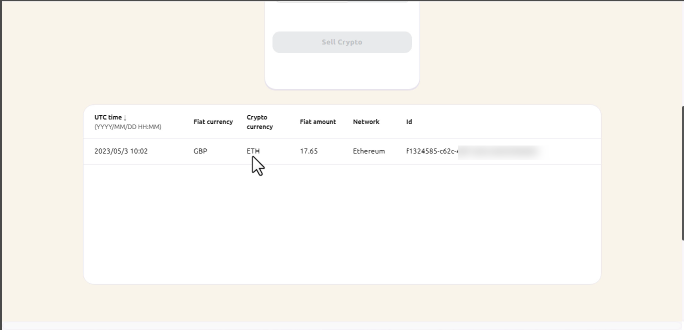
12. Scroll down and check your transaction.

<figure><img src="https://1478603104-files.gitbook.io/~/files/v0/b/gitbook-x-prod.appspot.com/o/spaces%2FL8lItflvtIgpkNw9ssSm%2Fuploads%2FxMHU1m97noFnrVkzqVCH%2Fs11.png?alt=media&#x26;token=28bc5a14-5960-4d16-a488-7347fda6a7f7" alt=""><figcaption></figcaption></figure>

### Which providers do you support for On-Ramp and Off-Ramp services?

We currently support only transak for its excellent support and service in more than 150 countries and 75+ blockchains.

We are in the process of adding some more vendors in future for more options to our customers.