# Swap Tokens

### What is swap?

A swap is a type of transaction that allows for the exchange of one cryptoasset for another on the same blockchain network. It is a simple and convenient way for users to trade tokens without the need for a centralized exchange.

For example, a user may want to swap AAVE coins for SAND tokens on the Polygon blockchain network.

They provide a fast and efficient way for users to trade tokens on the same blockchain network while maintaining control of their own assets.

<br>

**How to Swap tokens on CrSIP?**

You will be redirected to the CrSIP Platform once you click on the **“Launch App”** button.

<figure><img src="https://1478603104-files.gitbook.io/~/files/v0/b/gitbook-x-prod.appspot.com/o/spaces%2FL8lItflvtIgpkNw9ssSm%2Fuploads%2FBTzjkF5MDRaIQYeaty9U%2F1.png?alt=media&#x26;token=2f102fa5-768d-4fe3-b1cc-e774c3a572d7" alt=""><figcaption></figcaption></figure>

<figure><img src="https://1478603104-files.gitbook.io/~/files/v0/b/gitbook-x-prod.appspot.com/o/spaces%2FL8lItflvtIgpkNw9ssSm%2Fuploads%2F9KqHCkEIj23LaS6O5IwV%2Fline%202.png?alt=media&#x26;token=38014e0e-b2af-4838-b0a6-0b3eefa302f3" alt=""><figcaption></figcaption></figure>

1. Make sure you are connected to your wallet.

<figure><img src="https://1478603104-files.gitbook.io/~/files/v0/b/gitbook-x-prod.appspot.com/o/spaces%2FL8lItflvtIgpkNw9ssSm%2Fuploads%2F4cEXnuk6iT7LMz1V0Sn1%2Fconnected%20wallet.png?alt=media&#x26;token=8b082c3e-611d-4a00-8986-6af23b687421" alt=""><figcaption></figcaption></figure>

<figure><img src="https://1478603104-files.gitbook.io/~/files/v0/b/gitbook-x-prod.appspot.com/o/spaces%2FL8lItflvtIgpkNw9ssSm%2Fuploads%2F0An5sRGTmdLukqhy2iGR%2Fline%202.png?alt=media&#x26;token=a1e75f23-8574-4ad5-b103-15da48b9bcae" alt=""><figcaption></figcaption></figure>

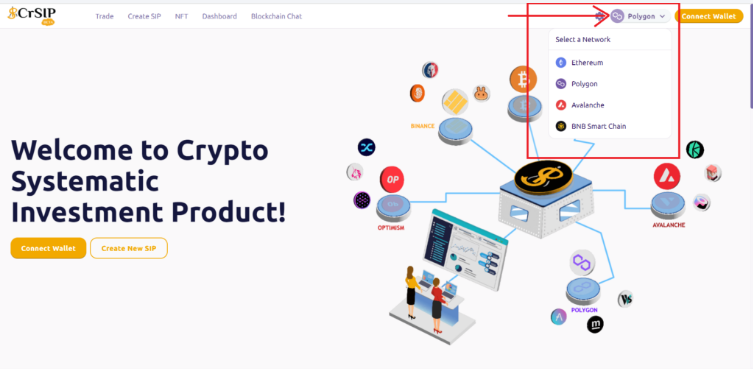
2. Select the **network** on which you would like to swap.

<figure><img src="https://1478603104-files.gitbook.io/~/files/v0/b/gitbook-x-prod.appspot.com/o/spaces%2FL8lItflvtIgpkNw9ssSm%2Fuploads%2FrGuSqbmowdcvNxM3dCsO%2F2.png?alt=media&#x26;token=171de596-979a-48c7-964f-1ca8e938e882" alt=""><figcaption></figcaption></figure>

<figure><img src="https://1478603104-files.gitbook.io/~/files/v0/b/gitbook-x-prod.appspot.com/o/spaces%2FL8lItflvtIgpkNw9ssSm%2Fuploads%2F0An5sRGTmdLukqhy2iGR%2Fline%202.png?alt=media&#x26;token=a1e75f23-8574-4ad5-b103-15da48b9bcae" alt=""><figcaption></figcaption></figure>

3. Choose the token from the dropdown menu that you want to trade.

<figure><img src="https://1478603104-files.gitbook.io/~/files/v0/b/gitbook-x-prod.appspot.com/o/spaces%2FL8lItflvtIgpkNw9ssSm%2Fuploads%2FJ0EgYaG4OnovtrGrCwph%2Fselect%20the%20token.png?alt=media&#x26;token=c0ae7cbc-30d8-4916-86e6-f85c26d30429" alt=""><figcaption></figcaption></figure>

<figure><img src="https://1478603104-files.gitbook.io/~/files/v0/b/gitbook-x-prod.appspot.com/o/spaces%2FL8lItflvtIgpkNw9ssSm%2Fuploads%2F0An5sRGTmdLukqhy2iGR%2Fline%202.png?alt=media&#x26;token=a1e75f23-8574-4ad5-b103-15da48b9bcae" alt=""><figcaption></figcaption></figure>

4. Enter the amount you want to swap, and in the lower section, you can see the number of tokens you want to swap, i.e. the receiving amount.

<figure><img src="https://1478603104-files.gitbook.io/~/files/v0/b/gitbook-x-prod.appspot.com/o/spaces%2FL8lItflvtIgpkNw9ssSm%2Fuploads%2FIa7OoJWqH9eb0V4bocf1%2F1.png?alt=media&#x26;token=a1631771-f3ab-4397-9ad8-5b357c4dcbe0" alt=""><figcaption></figcaption></figure>

<figure><img src="https://1478603104-files.gitbook.io/~/files/v0/b/gitbook-x-prod.appspot.com/o/spaces%2FL8lItflvtIgpkNw9ssSm%2Fuploads%2F0An5sRGTmdLukqhy2iGR%2Fline%202.png?alt=media&#x26;token=a1e75f23-8574-4ad5-b103-15da48b9bcae" alt=""><figcaption></figcaption></figure>

5. Click on the "**Give permission** **to swap**" button.&#x20;

<figure><img src="https://1478603104-files.gitbook.io/~/files/v0/b/gitbook-x-prod.appspot.com/o/spaces%2FL8lItflvtIgpkNw9ssSm%2Fuploads%2FnkJLuUJ1pdXwyQkboQch%2F2.png?alt=media&#x26;token=b56827d5-27f6-4429-9540-74c0aeab2b24" alt=""><figcaption></figcaption></figure>

<figure><img src="https://1478603104-files.gitbook.io/~/files/v0/b/gitbook-x-prod.appspot.com/o/spaces%2FL8lItflvtIgpkNw9ssSm%2Fuploads%2F0An5sRGTmdLukqhy2iGR%2Fline%202.png?alt=media&#x26;token=a1e75f23-8574-4ad5-b103-15da48b9bcae" alt=""><figcaption></figcaption></figure>

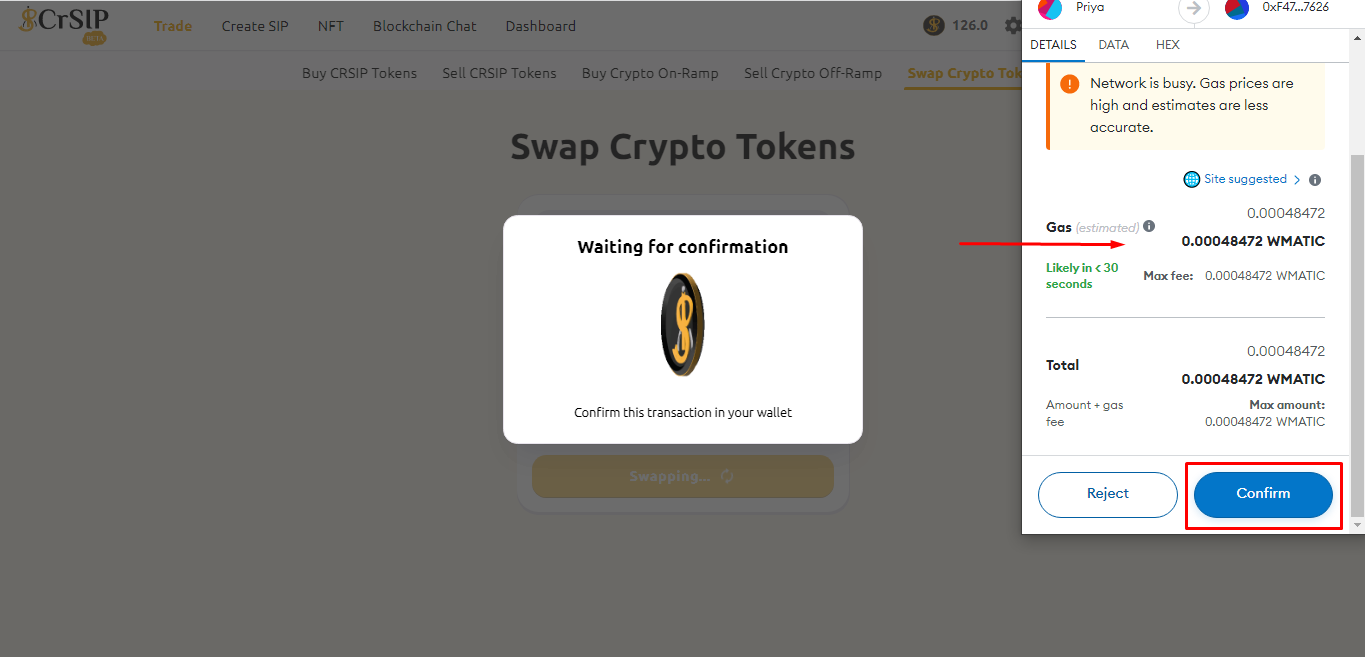
6. Once you confirm the gas fees, click "**Approve**". &#x20;

<figure><img src="https://1478603104-files.gitbook.io/~/files/v0/b/gitbook-x-prod.appspot.com/o/spaces%2FL8lItflvtIgpkNw9ssSm%2Fuploads%2Fc1DgL60gejkBpRHptpU9%2F4.png?alt=media&#x26;token=90a170ff-f0df-4a77-a572-deec33ec4963" alt=""><figcaption></figcaption></figure>

<figure><img src="https://1478603104-files.gitbook.io/~/files/v0/b/gitbook-x-prod.appspot.com/o/spaces%2FL8lItflvtIgpkNw9ssSm%2Fuploads%2F0An5sRGTmdLukqhy2iGR%2Fline%202.png?alt=media&#x26;token=a1e75f23-8574-4ad5-b103-15da48b9bcae" alt=""><figcaption></figcaption></figure>

7. Click on "**Confirm**" to give permission to access your wallet.

<figure><img src="https://1478603104-files.gitbook.io/~/files/v0/b/gitbook-x-prod.appspot.com/o/spaces%2FL8lItflvtIgpkNw9ssSm%2Fuploads%2FPXBfrkICJri7Ebd0HFCX%2F5.png?alt=media&#x26;token=23d5c5da-6cd5-4480-9d45-745c99ebf626" alt=""><figcaption></figcaption></figure>

<figure><img src="https://1478603104-files.gitbook.io/~/files/v0/b/gitbook-x-prod.appspot.com/o/spaces%2FL8lItflvtIgpkNw9ssSm%2Fuploads%2F0An5sRGTmdLukqhy2iGR%2Fline%202.png?alt=media&#x26;token=a1e75f23-8574-4ad5-b103-15da48b9bcae" alt=""><figcaption></figcaption></figure>

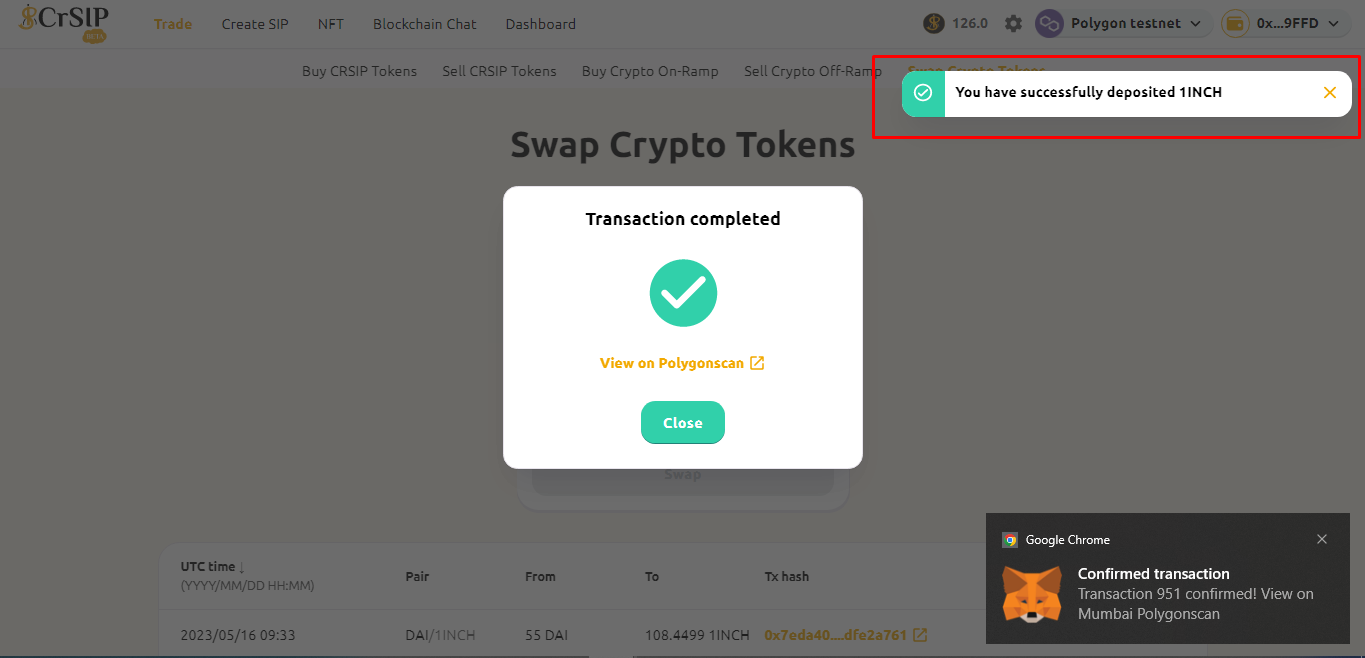
8. Once you have completed your transaction, click on "**close**".

<figure><img src="https://1478603104-files.gitbook.io/~/files/v0/b/gitbook-x-prod.appspot.com/o/spaces%2FL8lItflvtIgpkNw9ssSm%2Fuploads%2FNlP3bu68f5QTcyZ70CtY%2F6.png?alt=media&#x26;token=8090a030-7c3e-4364-ab32-c429ecdf9f07" alt=""><figcaption></figcaption></figure>

<figure><img src="https://1478603104-files.gitbook.io/~/files/v0/b/gitbook-x-prod.appspot.com/o/spaces%2FL8lItflvtIgpkNw9ssSm%2Fuploads%2F0An5sRGTmdLukqhy2iGR%2Fline%202.png?alt=media&#x26;token=a1e75f23-8574-4ad5-b103-15da48b9bcae" alt=""><figcaption></figcaption></figure>

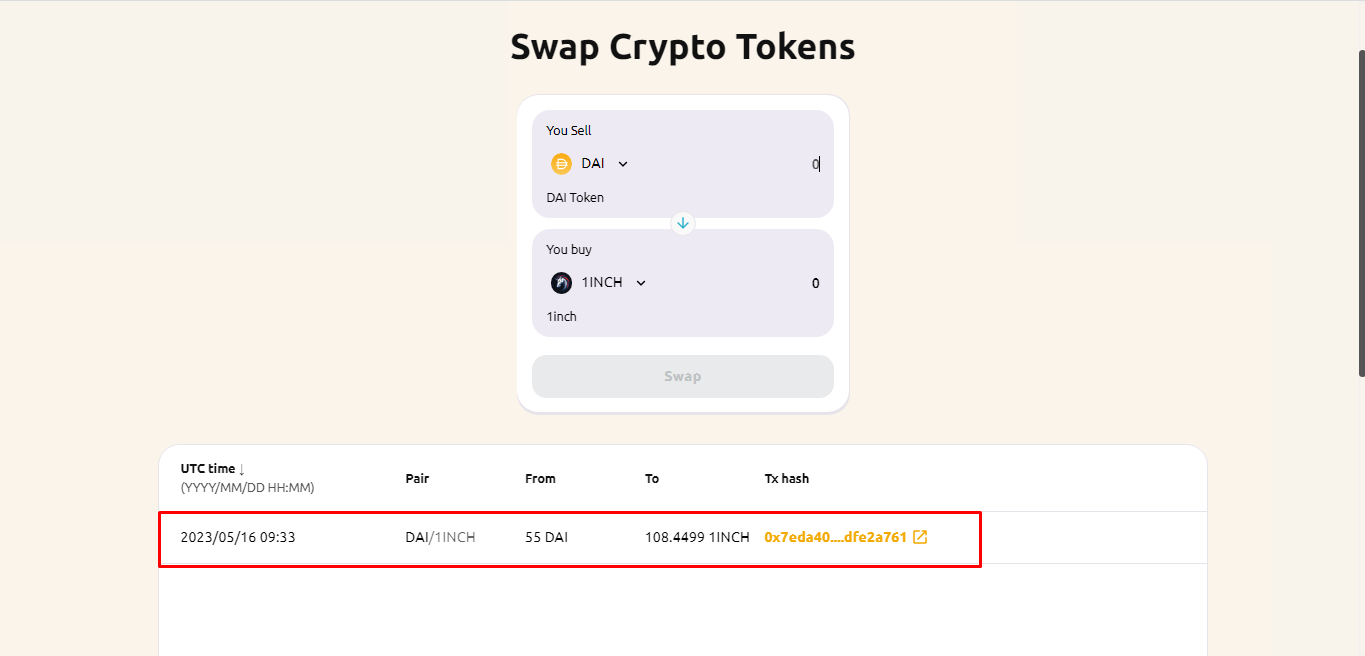
9. Scroll down to verify all the transaction details.

<figure><img src="https://1478603104-files.gitbook.io/~/files/v0/b/gitbook-x-prod.appspot.com/o/spaces%2FL8lItflvtIgpkNw9ssSm%2Fuploads%2FLWUf7mh7sSUwX81xL4Ah%2F8.png?alt=media&#x26;token=bc167e9d-65b2-4fee-b7d8-f489b2f82547" alt=""><figcaption></figcaption></figure>

### What are the charges that the CrSIP Platform charges to swap?

Swapping coins on the CrSIP platform has a 0.6% swap fee.